
The term dieline seems to be a technical term that is just understood by packaging designers. But it is not the truth. The dieline is simple and easy. Want to explore further? This guide helps you know everything, from what is dieline in packaging & printing to how to make it.
So, what are you waiting for? Let’s dive in to discover everything that you need to know and understand.
What Is A Dieline In Packaging?
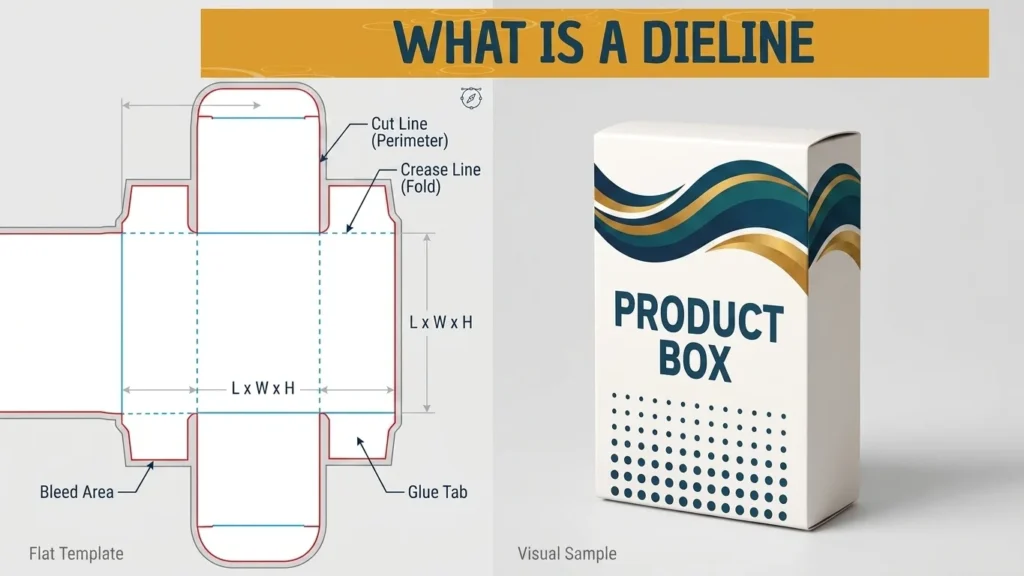
In the packaging industry, a dieline is a 2D flat template that is used to map out the exact dimensions, cuts, folds, and glue areas of the packaging before production. The dieline of the packaging serves as a digital blueprint that ensures artwork perfectly aligns with the final structure.
The dieline is a complete guide for packaging designers and manufacturers to ensure all the aspects meet your needs before production. With the help of dieline, you can see all sides of the packaging, format the artwork, and see exactly where the artwork will be applied.
Why Dieline In Printing & Packaging Matters A Lot?
Dieline is the glimpse of your packaging design. It is important for the design process of the packaging, from visualising box design to quality assurance. Here is a list of some of the most important benefits of knowing what is dieline in printing:

Error Detection & Proofing
The dieline allows designers to view the packaging design. Designers can identify the errors and make changes in the artwork, layout, and typography of the packaging accordingly. To get the desired outcome, packaging designers go through a lot of revisions. After the right refinements, they are able to provide the best results.
Visualising Final Dieline Design In 3D
To see the design of the packaging, you should use 3D software like Pacdora or Esko Studio Illustrator to create 3D samples. Using software, you can visualise how packaging will look like. The visualisation of the packaging keeps the placement of visual elements while helping to find the potential errors.
The packaging designers and manufacturers share the 3D samples with all the stakeholders such as clients, packaging engineers, and other persons to get approval.
Die Cutting
The materials are die-cut into any size and shape to craft a packaging that matches your brand needs. Packaging designers make use of dielines to design packaging boxes accordingly. The process of die-cutting involves laser engravers to etch the die layout onto materials with the help of state-of-the-art die-cutting tools.
Prototyping
The prototype is the perfect way to know what your packaging looks like before full-scale production. It allows you to review every aspect of the packaging, from structure and packaging design. If there is any error, stakeholders request to change.
Packaging Dieline vs. Packaging Template
Many buyers confuse these terms. A dieline is production-ready, while a template may only be for design visualisation. Have a look at both of these terms at a glance:
| What Is Packaging Dieline | What Is Dieline Template |
| Technical structural file | Design mockup |
| Used for manufacturing | Used for visual design |
| Includes cut and fold lines | May not include production details |
How To Read The Dielines?
A dieline is the basic view of the packaging design. It is the fundamental blueprint for packaging manufacturers and designers to create packaging and dielines as per your packaging design and needs. The requirements may slightly vary but the fundamentals remain the same.
Cut Lines (Trim Lines)
Cut lines are shown as solid black lines that show where to cut. These lines show the exact size of your packaging after the die-cutting process.
Bleed Lines
These lines are visible as solid green lines to identify the extra printing space (bleed area) that extends beyond the cut line. Extending your artwork to these lines prevent design elements from being cut off in the final design.
Fold Lines (Crease Lines)
These lines appear as solid red lines to show packaging creasing and folding. to
Safety Lines (Margin Lines)
These lines indicate green dotted lines to mark the safe zone for the graphics and artworks of the packaging design. These lines keep these design elements within the safety area.
Perforation Lines
Perforation lines are denoted as black dotted or dashed lines to show where the packaging should be punched, making it easier to fold.
Glue Tabs (Seal Tabs)
Glue tabs are the green crisscross tabs that express the placement of glue or adhesive while designing the packaging.
How To Create Dielines
Working with a packaging designer or manufacturer? You don’t need to dieline packaging yourself. They handle this headache. If you are in the packaging industry, knowing to create a dieline is important.
Use Structural Design Software
There are several software packages to design the packaging. Have a look at some of the important software:
ArtiosCAD
To make dielines, professional software like ArtiosCAD is the perfect option to design complex packaging layouts and detect quality issues. It also creates a 3D visualisation to show the packaging.
Adobe Illustrator
You can also use Adobe Illustrator to create artwork, graphics, and visual elements of packaging. It is not ideal for creating dieline structures. Why? It requires adjustments or conversions before printing or die-cutting.
Pacdora
It offers a collection of design templates to create dielines and 3D mockups and allows you to focus on packaging design.
Defining the Flat Size & Layout
It is an important step to define the flat size and layout of your packaging. This is best to share existing samples similar to your needs. It gives packaging designers a clear starting point.
Include Dieline Markers
Creating dieline markers indicate where the packaging will be cut, folded, and glued. These markers help the production team to create and assemble the packaging efficiently.
Output Format
Make sure to save the final file in an editable vector format while designing the packaging. Set the colour mode to the CMYK colour scheme to keep your design sharp and vivid.
The Die-Cutting Process
After printing dieline on the packaging, die-cut packaging as per your packaging needs. The printed material goes into a die-cutting machine, where cutting plates press the die with the right force to create accurate cuts.
Need Help Creating A Dieline?
Not a designer or manufacturer? No worries! Tycoon Packaging UK has all the skills to make dielines of custom product packaging of any kind through our customisable packaging solutions. So, what are you waiting for? Feel free to contact us as soon as possible.
Final Thoughts
A packaging dieline is the foundation of successful custom packaging. Without it, even the best graphic design cannot function correctly in production. For packaging buyers, understanding dielines means fewer errors, faster production, cost control, and brand presentation. If you’re planning a custom packaging project, make sure your dieline is engineered for precision, performance, and print accuracy.
Frequently Asked Questions
What is the purpose of a packaging dieline?
A packaging dieline provides the structural blueprint for cutting, folding, and assembling packaging accurately during production.
Who creates packaging dielines?
Packaging engineers or structural designers create dielines using CAD software like ArtiosCAD or Adobe Illustrator. They also offer some of the best dieline examples to inspire you.
What file format should a packaging dieline be in?
Vector formats such as AI, EPS, or print-ready PDF are preferred for manufacturing.
How much bleed is required in packaging dielines?
Typically, 0.125 inches bleed is required, but this can vary depending on printer specifications.
Can I create my own packaging dieline?
While possible to use design software, professional dieline creation is recommended to ensure structural accuracy and production efficiency.